
View old version of this page
Next new page


View popups and dropdowns
Back to START.

Explanation page
Previous new page


Save your Foundational Puzzle Kit
Save the P12 definition file
This saves the puzzle kit's definition file – called its "P12" file – to a folder on your computer.

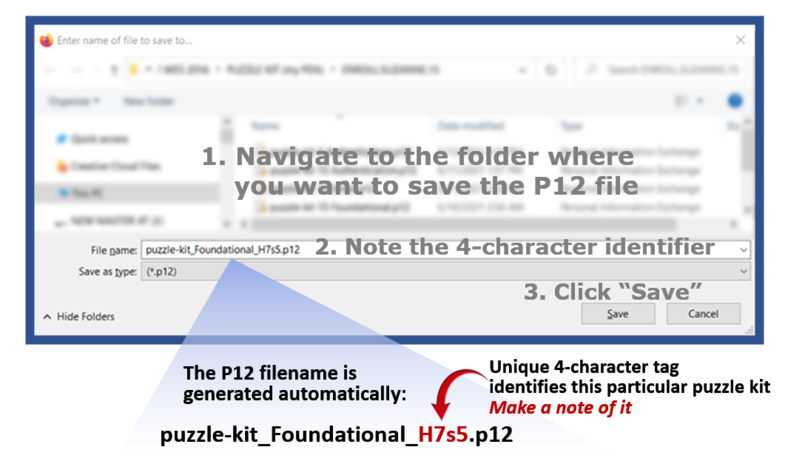
Clicking the blue "Save" button further down will open
a dialog box for saving the P12 definition file, where you will:
SN comment: This button takes you to the dialog box described above. Hitting SAVE in that dialog box will then advance automatically to the next (import) page -- so there's no other place to put the instructions shown above.

TIP
Make a note of:
● The P12 password (from the previous step)
● The folder where you save the P12 file (in the next step)
● The 4-character identifier in the P12 filename (in the next step)

View PCN and PEN
for this puzzle kit
Instructions in advance for the next step:
1. Navigate to the folder where you want to save the P12 file
2. Write down the 4-character identifier in the P12 filename
3. Click SAVE
Overview of the enrollment process

SN comment:
Let's think about having a standard location and folder for storing P12 files. This could eliminate the two steps of (1) manually SAVING the P12 file in this step, and (2) manually SELECTING the P12 file at the later "import P12" step. I don't know if this might cause complications down the road when selecting a certificate to use for a particular purpose, because you would not have seen the particular 4-character code for a particular certificate. We could create a little command to access your collection of certificates, if you need to figure out and identify a particular one (maybe by the date it was created, rather than its 4-character tag?)